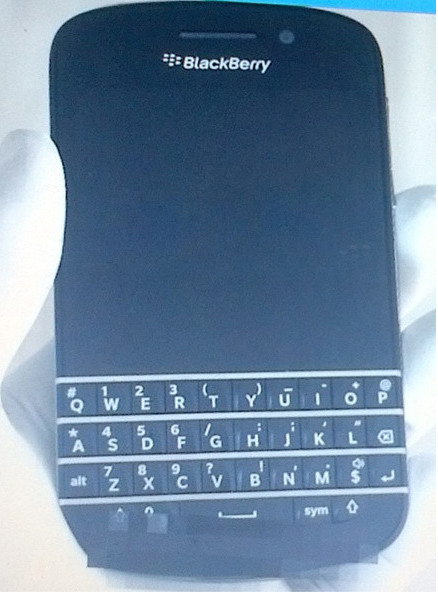
BlackBerry N-Series QWERTY Shows Up Without Navigation and Menu Buttons


Here comes another live photos of the new blackberry phones. The one in which will be released in full touch screen and another one will be released in QWERTY keyboard.

Only a few days after its touchscreen sibling made a couple of appearances, RIM's BlackBerry N-Series smartphone emerged in a duo of live photos. The soon to be revealed BlackBerry 10 smartphone packs a hardware QWERTY keyboard in addition to its capacitive touchscreen.


As you can see in the photos above, the BlackBerry N-Series looks a lot like the currently offered Bold 9900, save for the lack of navigation and menu buttons, which have given way to a larger screen. The QWERTY appears to be unsurprisingly well-made and comfortable, so the BlackBerry purists should have a good reason to look forward to the device.

The BlackBerry N-Series is all but certain to launch alongside the BlackBerry Z10 on January 30 in New York City. We will update you should we hear more about the upcoming device. So let't wait for the price then.

Source

Huawei Ascend Mate Reveals 6.1" Quad-Core Android with a 1080p Resolution


Currently, another call from Android devices sounded from Chinese manufacturer. Richard Yu Huawei Chairman of devices showed off the Ascend Mate - a 6.1" quad-core Android smartphone with a 1080p resolution At a Huawei store in Guangzhou, China.

The device is said to be powered by a quad-core K3V3 chip clocked at 1.8 GHz, and offer a 4000 mAh battery, 9.9 mm frame and a screen with the impressive 361 ppi density. Richard Yu shared that the display is of the LTPS type, meaning low temperature polysilicon.
 
Prior to Richard Yu's demonstration of the Ascend Mate Huawei's Senior Vice President Yu Chengdong confirmed the company is working on such a device.

The Ascend Mate should make an appearance at CES, alongside the 5" Ascend D2, and should cost around $480 (¥3000).
It remains to be seen what version of Android the Ascend Mate will be running but Jelly Bean is a safe bet.

So for those who want to get this phablet on their hands and try to use another big-screen phone should wait for a moment. Let's check it out from this video.

The Launching Date of Blackberry 10 has been Confirmed


This is a great news for the Blackberry fans out there. During these months after getting delayed, RIM's BlackBerry 10 platform finally has a launch date set. On January 30, RIM will hold multiple events across the world simultaneously where it will launch both the OS and the first the BlackBerry phones to use it.

The BB 10 OS will hit the ground running - it will launch with "a large catalog of the leading applications from across the globe and across all categories" and a FIPS 140-2 certification (which means that government agencies can switch to BB 10 right away and count on security). You can read more about FIPS 140-2 over here.

During the event, RIM will give details on the two launch phones and their availability. We've most likely seen them already - the touchscreen operated L-series and the more traditional QWERTY-packing N-Series. Then there's the rumored BlackBerry 10 Aristo device with a quad-core Krait and a 4.65" AMOLED 720p display.

RIM's press release didn’t say anything about the first two BlackBerry 10 phones, so the Aristo remains in the rumor mill for now, but the company did say that the phones are being tested by 50 carriers (with more on the way), pointing to a wide launch.

For me myself i can't wait to see the Blackberry 10's releasing as well. It seems pity to know that Blackberry is not active as other smartphone brand did.

iPhone 5S Trial Production is Planned on the Next Month


We all know that the best phone so far which is iPhone 5 just been released on the market. People are also still tasting the device on their hands not so long. But the news is already reached us that the next 5s is already begun to be on the trial production.

A story coming from the Commercial Times is suggesting that Apple have no intention of resting on their laurels when it comes to updating and upgrading their iPhone hardware and could be planning on initiating a trial production run of iPhone 5S handsets as early as next month. It seems nothing short of madness to suggest that the Cupertino based company could be even contemplating pushing out a new iPhone so soon after the successful release of the current model iPhone 5, but as far-fetched as the report may seem on the surface it does actually raise a few intriguing points that could add some fuel to this one. The publication is making reference to the fact that Apple have been facing low yield rates for certain components that are included in the iPhone 5 and could therefore take action to accelerate the launch of its successor.


Any devices that are born from a trial production run taking place toward the end of this year wouldn’t make it in the hands of the public, but it is also being speculated that should an initial trial prove successful, Apple could be looking to put the iPhone 5S into mass production in the first quarter of 2013. Apple’s current iPhone 5 is the sixth-generation smartphone to come from the fruit company, with all previous releases either following or going beyond a twelve month release schedule. Given previous release history it seems highly unlikely that we will be seeing a new iPhone in the next few months.

Until we hear anything additional or concrete from reliable and tested sources then I think it is safe to assume that the current iPhone 5 will see us through until at least September/October of 2013. However, when that time does arrive it will be extremely interesting to see whether or not Apple will go down the route of releasing a totally revamped handset or do actually make incremental updates and push out an iPhone 5S.

So, from this we can see as we wait for the 5s or buying this iPhone 5 in which we know that there are many things should be fixed inside the phone already.

(Via redmondpie)

How to Root Sony Xperia T running on Android 4.0 Ice Cream Sandwich [Tutorial]


Another Xperia series showing up to ready to be rooted. This time we will explain a tutorial about how to root Sony Xperia T which released with an official Android 4.0 Ice Cream Sandwich. Previously we have explained and posted the same tutorial for Xperia which is Sony Xperia S, now for those the owners of Sony Xperia T do not worry not to get the rooting guide.

Thanks to xda forum members who always try their best to make the Android OS looks better in its performance and customization. So, here we go please read this tutorial carefully. The choice between rooting or not lies on your hand.


Caution: In my experience nothing has ever gone wrong with rooting. There is always that slight chance something can mess up. Use caution and only do this if you want to. I am not responsible if anything happens (but I really don’t think anything will happen if you do everything right)  Also rooting voids your warranty but don’t worry, unrooting should give it back like nothing ever happened.!! Please read about Rooting here.

Note:
  • The instructions in this guide are intended for use with the Sony Xperia T running on Android 4.0 Ice Cream Sandwich. Applying these instructions on another device or model may produce undesired outcomes.
  • The information in this guide is provided for instructional and educational purposes only. There is no guarantee that these instructions will work under your specific and unique circumstances.
  • Use these instructions at your own risk. We shall not hold any responsibility or liability for whatever happens to you or your device arising from your use of the info in this guide.
  • Read and understand the whole guide first before actually performing the instructions.
  • This Procedure will definitely void your warranty, although the warranty can be claimed by un-rooting your device.


What you need to prepare:
  • A Sony Xperia T running on Android 4.0 Ice Cream Sandwich and a PC
  • Backup all personal data on your phone to make sure you have a copy of your personal data (e.g., contacts, SMS, MMS, Internet settings, Wi-Fi passwords, and the like) in case the procedure in this guide erases such data. Guide from here
  • Make sure your device has at least 75% of phone battery charge.


How to root using Bin4ry’s Root Tool
  • Download the tool from here.
  • Extract the downloaded zip file to a convenient location on the computer.
  • Ensure that you are running an Android 4.0 or Android 4.1 ROM on your device. This will not work on Android 2.3 or older versions of Android.
  • Make sure drivers for your Android device are installed on the computer. Drivers for most devices can be installed by installing the manufacturer’s PC suite software.
  • On your phone/tablet, enable USB debugging in the Settings » Developer options menu.
  • Run the tool by double-clicking the RunMe.bat file from the folder where you extracted the tool in step 2.
  • Then, make the correct choice according to whatever device you have (enter 4 for the normal method which is to be used for all non-Sony devices), then press Enter.
  • Connect your device to the computer. Then, follow on-screen instructions to root your device.

Congratulation ! now your Sony Xperia T has been rooted. Enjoy the advantages of the rooted device. Please give us a feedback on the comment section below.

How to Root Sony Xperia S running on Android 4.0 Ice Cream Sandwich [Tutorial]


Sony Xperia S is one of the best smartphones on the market so far. It is released with the official Android 2.3 Gingerbread, but lately it is planed to updagre to Android 4.0 Ice Cream Sandwich. For those who have Sony Xperia S running on Android 4.0 Ice Cream Sandwich and want to root their device, on this article i will show you how to root the Sony Xperia S using one amazing tool called Bin4ry's root tool.

Thanks to xda forum members who always try their best to make the Android OS looks better in its performance and customization. So, here we go please read this tutorial carefully. The choice between rooting or not lies on your hand.


Caution: In my experience nothing has ever gone wrong with rooting. There is always that slight chance something can mess up. Use caution and only do this if you want to. I am not responsible if anything happens (but I really don’t think anything will happen if you do everything right)  Also rooting voids your warranty but don’t worry, unrooting should give it back like nothing ever happened.!! Please read about Rooting here.

Note:
  • The instructions in this guide are intended for use with the Sony Xperia S running on Android 4.0 Ice Cream Sandwich. Applying these instructions on another device or model may produce undesired outcomes.
  • The information in this guide is provided for instructional and educational purposes only. There is no guarantee that these instructions will work under your specific and unique circumstances.
  • Use these instructions at your own risk. We shall not hold any responsibility or liability for whatever happens to you or your device arising from your use of the info in this guide.
  • Read and understand the whole guide first before actually performing the instructions.
  • This Procedure will definitely void your warranty, although the warranty can be claimed by un-rooting your device.


What you need to prepare:
  • A Sony Xperia S running on Android 4.0 Ice Cream Sandwich and a PC
  • Backup all personal data on your phone to make sure you have a copy of your personal data (e.g., contacts, SMS, MMS, Internet settings, Wi-Fi passwords, and the like) in case the procedure in this guide erases such data. Guide from here
  • Make sure your device has at least 75% of phone battery charge.


How to root using Bin4ry’s Root Tool
  • Download the tool from here.
  • Extract the downloaded zip file to a convenient location on the computer.
  • Ensure that you are running an Android 4.0 or Android 4.1 ROM on your device. This will not work on Android 2.3 or older versions of Android.
  • Make sure drivers for your Android device are installed on the computer. Drivers for most devices can be installed by installing the manufacturer’s PC suite software.
  • On your phone/tablet, enable USB debugging in the Settings » Developer options menu.
  • Run the tool by double-clicking the RunMe.bat file from the folder where you extracted the tool in step 2.
  • Then, make the correct choice according to whatever device you have (enter 4 for the normal method which is to be used for all non-Sony devices), then press Enter.
  • Connect your device to the computer. Then, follow on-screen instructions to root your device.

Congratulation ! now your Sony Xperia S has been rooted. Enjoy the advantages of the rooted device. Please give us a feedback on the comment section below.

Intel Seems Working on Future Mobile Devices Using 48-Core Processors


Nokia only recently claimed single -ore processors were all that was needed to power today’s smartphones, though thanks to market pressure, compromised in bringing a dual-core chip to the Lumia 920. Look at the entire smartphone and tablet market, and you’ll notice each vendor is following a similar motif in adding more cores as a form of natural progression. However, if you thought the Galaxy S III was a bit of a powerhouse with its quad-core Exynos processor, wait until you get a load of what Intel is cooking up.

The company, which is by far the foremost manufacturer of processors in the world of computing, is looking to build an incredible 48-core processor for smartphones and tablets. Considering the speed of the iPhone 5, for example, which runs on a dual-core A6 chip, a 48 core chip should be one notch slower than telepathy, right?


Well in actual fact, while the core count is certainly a useful component in determining the overall speed of a device, it’s certainly not the end-all, be-all. In a similar manner to which the number of megapixels is used to monopolize smartphone cameras, many consumers are led to believe that a device with more cores than another is, by and large, a more efficient one.

Cores serve to chop up big tasks into digestible chunks, so the more cores you have, the more chunks can be dealt with without lagging up the device. Thus, if you have 48 cores, than number of complicated tasks could occur at the same time. Before you all get excited, though, the experts have already waded in and insisted the technology is a decade off reaching our prized mobile assets.


Undeterred by the claims of a ten-year wait, however, Intel’s chief technology officer believes 48-core processors could make an appearance long before then, and seems pretty enthusiastic about his company’s progress. Speaking with Computerworld, he noted:

I think the desire to move to more natural interfaces to make the interaction much more human-like is really going to drive the computational requirements. Having large numbers of cores to generate very high performance levels is the most energy efficient way to deliver those performance levels.

Suddenly, my dual-core smartphone feels decidedly slow.

You can follow us on Twitter, add us to your circle on Google+ or like our Facebook page to keep yourself updated on all the latest from Microsoft, Google, Apple and the web.

Source